
СОДЕРЖИМОЕ ПУБЛИКАЦИИ
How to Add Lyrics on OSAnime
OSAnime allows registered members to contribute lyrics to music available on the platform. You can add regular lyrics, translated lyrics, romanized lyrics, or timestamped LRC lyrics directly from the music detail page.
This guide explains everything you need to know about adding lyrics on OSAnime, including supported file formats, language selection, LRC timestamps, and how to submit your contribution correctly.
1. Sign In to Your OSAnime Account
Before adding lyrics, make sure you are signed in to your OSAnime account. Lyrics contributions are available to registered members so that submissions can be associated with the contributor.
After signing in, open the music page for the song you want to contribute to.
2. Open the Music Detail Page
Find the song using OSAnime Search, Music Hitz, Anime Music, playlists, or other music sections.
On the music detail page, you will see several available actions such as Start Radio, Play Next, Add to Queue, Lyrics, and Add Lyrics.
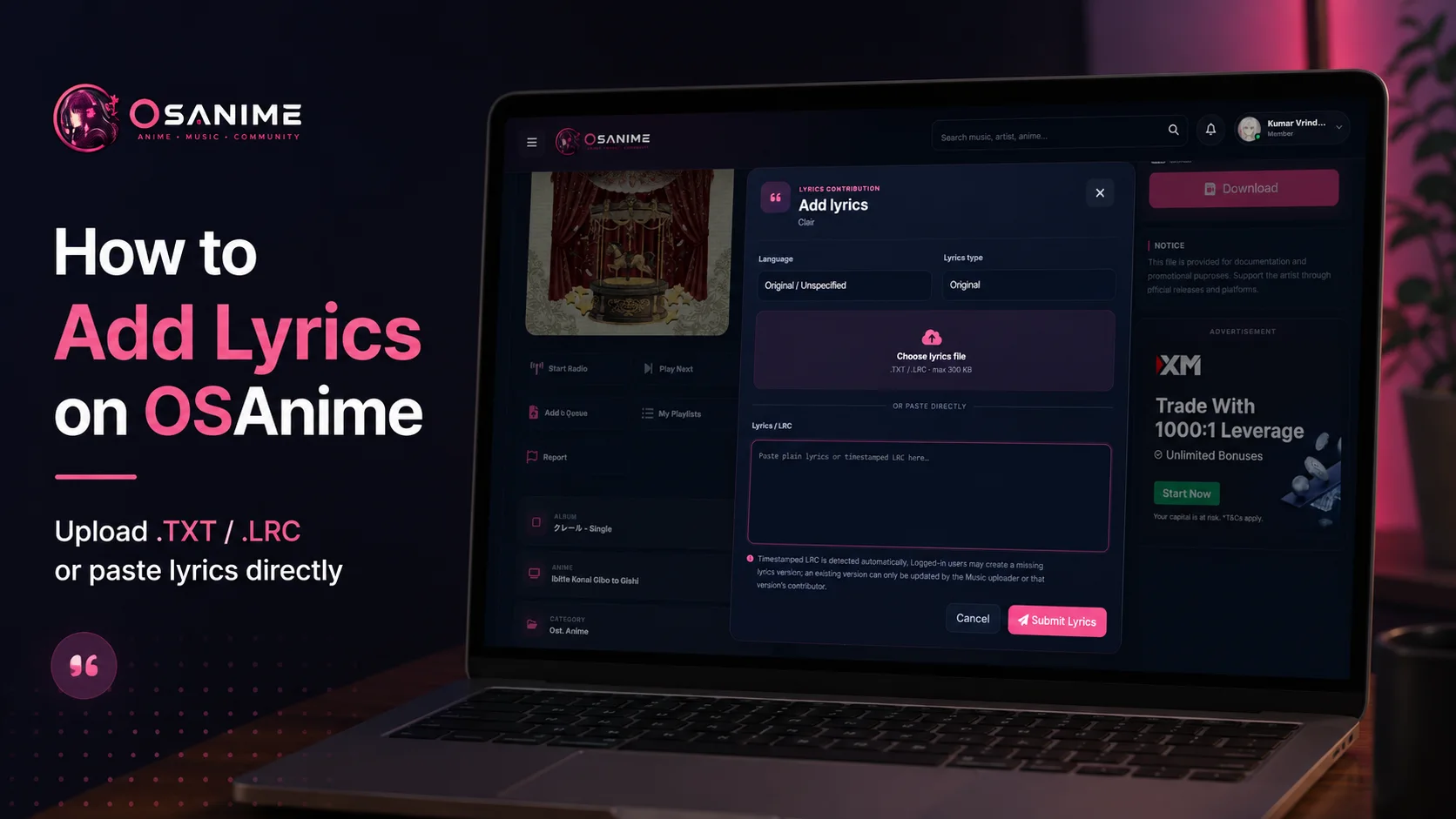
Click Add Lyrics to open the lyrics contribution form.
3. Select the Lyrics Language
In the Language field, select the language that matches the lyrics you are submitting.
If you are submitting the song in its original language and no specific language selection is required, you may use Original / Unspecified.
Selecting the correct language is important because OSAnime can store multiple lyrics versions for the same song.
4. Choose the Correct Lyrics Type
Next, select the appropriate Lyrics Type. The available options may depend on the song and the language you selected.
Typical lyrics types include:
- Original — Lyrics written in the song's original language.
- Translation — Lyrics translated into another language.
- Romanized — Lyrics converted into Latin/Roman characters, such as Japanese Romaji or Korean Romanization.
Always choose the option that accurately describes your submission.
5. Choose How You Want to Add the Lyrics
OSAnime provides two convenient ways to submit lyrics:
Option A — Upload a Lyrics File
Click Choose lyrics file and select a supported lyrics file from your device.
Supported formats: .TXT and .LRC
Maximum file size: 300 KB
TXT files are suitable for regular plain-text lyrics, while LRC files can contain timestamps that synchronize lyrics with the music.
Option B — Paste the Lyrics Directly
If you do not have a lyrics file, you can simply paste the lyrics into the Lyrics / LRC text box.
You may paste either normal lyrics or timestamped LRC lyrics.
6. Adding Regular Lyrics
Regular lyrics do not require timestamps. Simply enter each lyric line in the correct order.
Example:
I can hear your voice tonight
Underneath the endless sky
Every memory stays with me
Until the morning light
Keep the formatting clean and avoid unnecessary symbols, advertisements, website links, or unrelated text.
7. Adding Timestamped LRC Lyrics
OSAnime also supports timestamped LRC lyrics. LRC timestamps allow each lyric line to appear at the correct moment while the song is playing.
OSAnime automatically detects timestamped LRC content when valid timestamps are included.
The basic LRC format looks like this:
[00:12.50]First line of the lyrics
[00:17.80]Second line of the lyrics
[00:23.20]Third line of the lyrics
[00:29.10]Fourth line of the lyrics
Each timestamp represents the point in the song where the corresponding lyric line should appear.
8. Understanding LRC Timestamps
A typical timestamp follows this format:
[MM:SS.xx]For example:
[01:24.35]This means the lyric line begins at approximately 1 minute, 24.35 seconds.
Accurate timestamps provide a much better synchronized lyrics experience, so we recommend checking your timing before submitting an LRC file.
9. Review Your Lyrics Before Submitting
Before clicking the submit button, review your contribution carefully.
Check that the language is correct, the lyrics type is appropriate, the song matches the lyrics, spelling is reasonably accurate, and any LRC timestamps are synchronized correctly.
Clean and accurate submissions help improve the experience for everyone using OSAnime.
10. Submit Your Lyrics
When everything is ready, click Submit Lyrics.
OSAnime will process your contribution and associate it with the selected music entry.
Do not repeatedly press the submit button while the request is being processed.
Creating a Missing Lyrics Version
Logged-in OSAnime members may create a lyrics version when that particular version does not already exist.
For example, a song may already have Japanese original lyrics but still be missing an English translation or Romaji version.
In that case, you can contribute the missing version by selecting the appropriate language and lyrics type.
Updating Existing Lyrics
Existing lyrics versions cannot necessarily be changed by every user.
An existing version may only be updated by the music uploader or the contributor of that lyrics version.
This system helps prevent other users from accidentally overwriting previously submitted lyrics.
Original, Translation, and Romanized Lyrics
Original Lyrics
Use this for lyrics written in the original language of the song.
Example for a Japanese song:
君の声が聞こえる
夜空を見上げながら
Romanized Lyrics
Romanized lyrics convert characters from another writing system into Latin characters while keeping the original pronunciation.
Example:
Kimi no koe ga kikoeru
Yozora wo miage nagara
Translated Lyrics
Translation lyrics convert the meaning of the original lyrics into another language.
Example:
I can hear your voice
As I look up at the night sky
TXT vs LRC: Which One Should You Use?
Use TXT when you only want to provide regular lyrics without synchronization.
Use LRC when you have timestamps and want the lyrics to synchronize with music playback.
If you paste timestamped LRC text directly into the lyrics field, OSAnime can automatically recognize the timestamps.
Recommended LRC Formatting
For the best results, use one timestamp for each lyric line and keep the timestamps in chronological order.
Recommended:
[00:05.20]First lyric line
[00:09.85]Second lyric line
[00:14.40]Third lyric line
[00:19.75]Fourth lyric line
Avoid placing unrelated text between timestamped lines unless it is actually part of the lyrics.
Tips for Better Lyrics Contributions
- Make sure you are adding lyrics to the correct song.
- Select the correct language before submitting.
- Select the correct lyrics type.
- Keep the original line order whenever possible.
- Check spelling and character encoding.
- Do not add advertisements or unrelated URLs to lyrics.
- For LRC lyrics, verify synchronization before submitting.
- Avoid duplicate submissions if the same lyrics version already exists.
- Use UTF-8 text encoding whenever possible.
Troubleshooting
The Add Lyrics button does not appear
Make sure you are signed in to your OSAnime account and are viewing a supported music detail page.
My lyrics file cannot be uploaded
Make sure the file uses a supported .TXT or .LRC format and does not exceed the 300 KB upload limit.
My LRC is being treated as normal lyrics
Check that each timestamp uses a valid LRC format such as:
[00:15.50]Lyrics line hereI cannot update existing lyrics
Existing lyrics versions can only be updated by the music uploader or the contributor responsible for that lyrics version.
The song does not have lyrics in my language
If the version is currently missing and your account is eligible to contribute, select the appropriate language and lyrics type and create the missing version.
Help Improve OSAnime
Lyrics contributions are a great way to help other OSAnime users enjoy their favorite anime, J-Pop, game, and Japanese music.
Whether you contribute original lyrics, translations, romanized lyrics, or synchronized LRC files, every accurate contribution helps make the OSAnime music library more useful for the community.
Find a song, open its music detail page, select Add Lyrics, and start contributing today.

КОММЕНТАРИИ 0
Присоединяйтесь к обсуждению с аккаунтом OSANIME.