POST CONTENT
OSAnime Creator Guide
How to Earn Money with OSAnime Using OUO
Earn additional revenue from music downloads on OSAnime by connecting your personal OUO account. Once enabled, eligible download destinations from music uploaded by your account can automatically use your OUO shortened links.
💰 What Is OUO Integration on OSAnime?
OUO is a URL shortening service that can monetize qualifying visits to shortened links. OSAnime provides an optional OUO integration so music uploaders can connect their own OUO account directly to OSAnime.
When the integration is enabled, OSAnime can automatically request an OUO short link for the final validated download destination belonging to music uploaded under your OSAnime account.
This means you do not need to manually shorten every download link one by one.
Upload Music → Visitor Opens Download → OSAnime Validates Destination → OUO Short Link → Visitor Continues to File
✅ What You Need
- An OSAnime account.
- An OUO account.
- Your personal OUO API key.
- Music uploaded using your OSAnime account.
- OUO integration enabled in your OSAnime account settings.
You do not need to manually create an OUO link for every music file after the integration has been configured.
1️⃣ Create an OUO Account
If you do not have an OUO account yet, you can register using the link below:
Complete the registration process and sign in to your OUO dashboard.
Make sure the information used for your OUO account is accurate and follow OUO's current terms, content rules, traffic policies, and payout requirements.
2️⃣ Open the OUO Quick Link Tool
After signing in to OUO:
- Open your OUO Dashboard.
- Go to Tools.
- Select Quick Link.
The Quick Link page contains information for creating shortened links and accessing the OUO API.
Look for the API section on that page. OUO normally displays an example API URL containing your personal API key.
Your OUO API key should be treated like a password. Never publish it in a comment, forum post, screenshot, public profile, or public source code.
3️⃣ Copy Your OUO API Key
On the OUO Quick Link page, locate your API information and copy only your personal API key.
Do not copy another user's API key and do not share your key with other OSAnime members.
Each member should connect their own OUO account.
4️⃣ Open OSAnime Integration Settings
Sign in to your OSAnime account and open:
Account Settings → Integrations → OUO Short Links
You can also open the integration page directly:
5️⃣ Enable OUO Short Links
Inside the OUO integration section:
- Find Integration Status.
- Select Enabled.
- Paste your personal OUO API key into the OUO API Key field.
- Click Save Integration.
After saving, OSAnime will securely store the configuration required for your OUO integration.
Your saved API key is hidden by default in the account interface.
6️⃣ How Automatic OUO Links Work
Once OUO integration is enabled, OSAnime can apply it automatically to eligible music downloads associated with your uploader account.
- A visitor opens one of your music pages.
- The visitor starts the download process.
- OSAnime validates the final download destination.
- OSAnime requests a shortened URL using your OUO integration.
- The visitor continues through the OUO link.
- OUO redirects the visitor toward the original download destination.
You therefore do not need to edit every download URL manually.
🔐 Your Files Are Not Proxied Through OSAnime
The OUO integration changes the destination link used in the download flow. It does not mean OSAnime needs to transfer the actual file bytes through the OSAnime server.
The original storage/download destination remains responsible for serving the file.
This keeps the integration lightweight and avoids unnecessarily consuming OSAnime server bandwidth for the file itself.
🛡️ Automatic Fallback
OSAnime's OUO integration is designed so that OUO does not become a single point of failure for the download system.
If OUO is temporarily unavailable or a short-link request cannot be completed, OSAnime can fall back to the normal validated download destination instead of permanently blocking the visitor.
Successful short-link results may also be reused where appropriate to reduce unnecessary API requests.
💵 How Do You Earn Money?
When eligible visitors pass through your OUO shortened links, qualifying traffic may generate revenue in your OUO account according to OUO's current monetization rules.
Your actual earnings can vary depending on factors such as:
- Number of qualifying visitors.
- Visitor country or region.
- Traffic quality.
- OUO's current advertising rates.
- OUO's current publisher policies.
- Whether a visit is considered valid or payable by OUO.
OSAnime does not guarantee a specific RPM, CPM, payment amount, or monthly income because those values are controlled by OUO and can change over time.
📈 Example
Imagine that you regularly upload popular anime music to OSAnime.
Instead of visitors going directly from OSAnime to the final file destination, eligible download requests can first use your OUO short link.
If your music attracts more legitimate download traffic, you may receive more qualifying OUO visits.
However, more clicks do not automatically mean a fixed amount of earnings. Final statistics and revenue are determined by OUO.
🎵 Which Downloads Use My OUO Account?
The integration is intended for music associated with your own OSAnime uploader account.
In other words, enabling OUO on your account should not automatically allow you to monetize another member's uploads using your API key.
Make sure you are signed in to the correct OSAnime account when uploading music.
🔄 How to Disable OUO Integration
If you no longer want to use OUO:
- Open Account Settings.
- Open the Integrations tab.
- Find OUO Short Links.
- Change Integration Status to Disabled.
- Save the integration settings.
Disabling OUO returns eligible downloads to OSAnime's normal direct download flow.
🗑️ How to Remove Your Saved API Key
If you want to completely disconnect the OUO API key from OSAnime, open the integration settings and use the option to remove your saved API key.
This is recommended if:
- You changed your OUO account.
- You regenerated your OUO API key.
- You accidentally exposed your API key.
- You no longer want to use OUO.
If you believe your API key has been exposed publicly, replace or regenerate it through OUO whenever that option is available.
🚨 Important Rules
The OUO integration is provided as an optional monetization feature. Members are responsible for following both OSAnime rules and OUO's current publisher terms.
- Do not generate fake traffic.
- Do not use bots to repeatedly visit shortened links.
- Do not click your own links repeatedly to manipulate earnings.
- Do not encourage users to perform artificial or misleading ad interactions.
- Do not share prohibited or illegal material.
- Do not publish your OUO API key.
- Use only an OUO account that belongs to you.
Artificial or prohibited traffic may be rejected by the advertising provider and can potentially result in account restrictions.
💡 Tips to Increase Legitimate Earnings
The best long-term approach is not generating artificial clicks. Focus on uploading useful music that people genuinely want to discover and download.
- Upload high-quality anime music.
- Use accurate song titles.
- Add the correct artist.
- Connect songs with the correct album.
- Add an appropriate cover image.
- Add lyrics when available.
- Use accurate anime information and metadata.
- Avoid duplicate uploads.
- Keep your uploads organized.
- Share your OSAnime music page naturally with relevant audiences.
Better metadata also helps OSAnime's search, artist pages, album pages, recommendations, Smart Radio, playlists, and other discovery features work more effectively.
❓ OUO Link Is Not Appearing?
If your downloads are still using the normal destination, check the following:
- Make sure OUO integration is set to Enabled.
- Make sure your API key was saved successfully.
- Make sure the music belongs to your uploader account.
- Make sure the destination URL is valid.
- Make sure your OUO account and API access are still active.
OSAnime may intentionally use the normal destination if the OUO API is unavailable, because the fallback system is designed to prevent visitors from being blocked.
❓ Does OSAnime Take My OUO Earnings?
The purpose of the personal OUO integration is to allow a member to connect their own OUO API configuration for eligible music uploaded through their account.
Your OUO statistics and eligible advertising revenue are managed through your OUO account according to OUO's terms and policies.
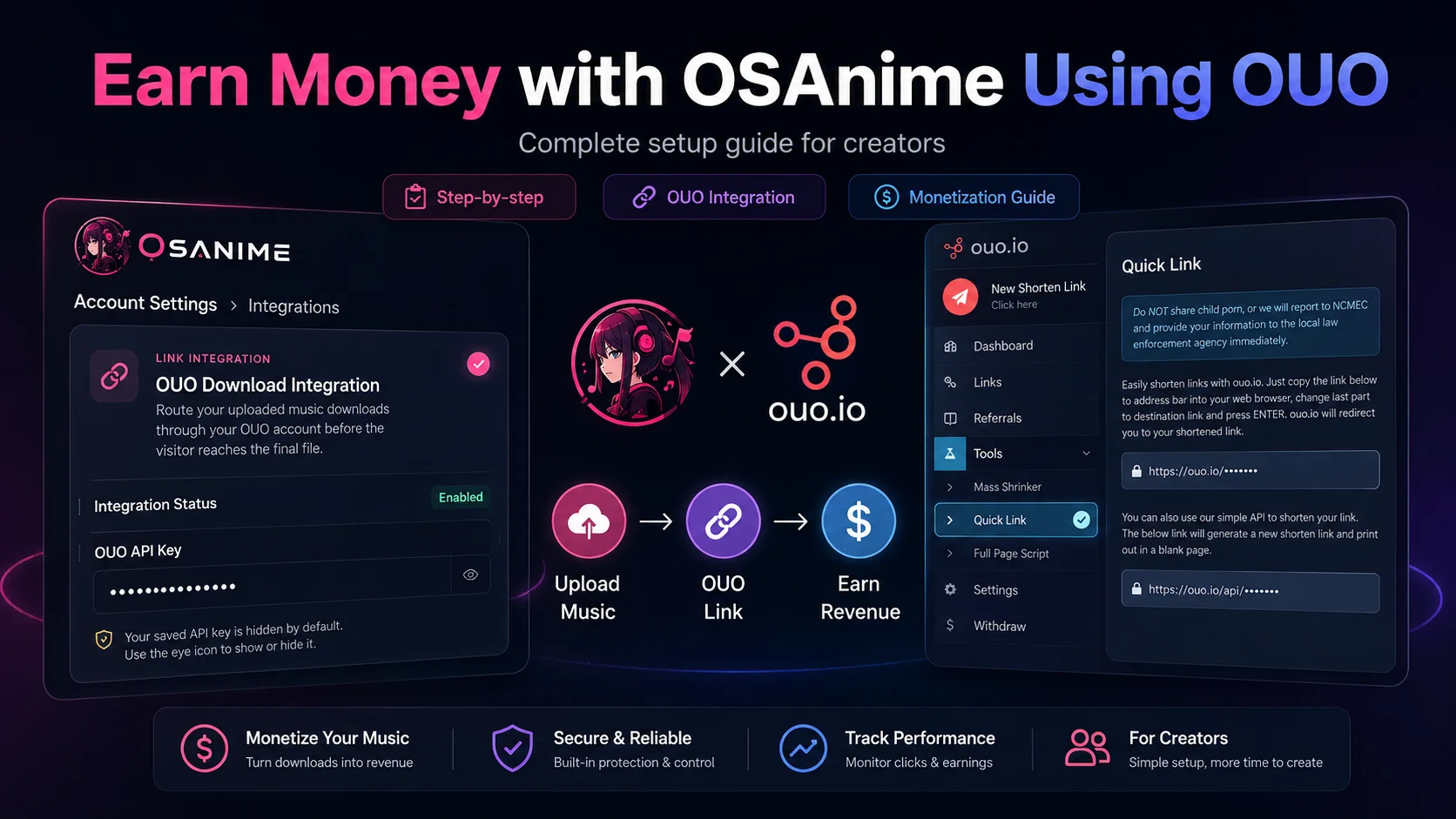
🚀 Start Earning with Your Music Uploads
If you regularly contribute music to OSAnime, connecting OUO gives you an additional way to potentially earn from legitimate download traffic while keeping the process automated.
Step 1: Create your OUO account.
Step 2: Get your API key from OUO → Tools → Quick Link.
Step 3: Open OSAnime → Settings → Integrations.
Step 4: Enable OUO, enter your API key, and save.
Step 5: Keep uploading quality anime music and let OSAnime handle the eligible short-link process automatically.

COMMENTS 0
Join the discussion with your OSANIME account.